
Introduction
If you are weighing a rebuild because AI startups promise a cleaner future, pause first. A wordpress site already gives you something many newer tools still struggle to match: a dependable content management system with structure, flexibility, and control. That is why WordPress still earns a place in any serious platform discussion. For teams choosing the best cms for growth, the real opportunity is often not replacement. It is upgrading what already works and making it AI-ready.
Why WordPress Remains the Backbone of Web Innovation
WordPress remains the best choice because wordpress core solves the basics of content management well. Teams can publish, organize, update, and scale without starting from scratch each time strategy changes. That reliability matters more than novelty.
Its wordpress market share also says something important about web development. Businesses keep choosing systems that are flexible, familiar, and supported by a deep ecosystem. AI has changed workflows, but it has not replaced the need for a strong platform underneath. That is where WordPress keeps winning, and the next sections show why.
Mature Taxonomy and Data Structure for Enterprise Sites
For enterprise sites, content chaos gets expensive fast. A mature taxonomy helps teams classify articles, landing pages, products, and resources in ways that stay useful over time. WordPress has long supported this kind of structured organization inside a proven content management system.
That matters because an enterprise wordpress site is rarely just a brochure. It usually includes departments, campaigns, archives, search needs, and approval flows. Fully AI-powered website solutions may generate pages quickly, but speed is not the same as structure. If your content is poorly organized, retrieval and governance become harder.
Just as important, WordPress lets teams grow without demanding extreme technical expertise for every update. Editors can manage categories, tags, and relationships from a familiar dashboard, while developers can extend the model when needed. For enterprise sites, that blend of usability and control is a practical edge, not a legacy limitation.
Custom Post Types Enable Complex, Scalable Content Models
One of WordPress’s most useful strengths is custom post types. They let you move beyond standard blog posts and pages into scalable content models that fit real business needs. That is a major advantage over AI-driven website platforms that often favor generic templates.
With custom post types, teams can structure content for different use cases without forcing everything into one format. That supports better governance, cleaner publishing, and more useful retrieval across web applications and digital properties.
- Create separate content models for case studies, product pages, team profiles, or knowledge articles.
- Pair custom post types with wordpress plugins to expand workflows without rebuilding the platform.
- Keep blog posts distinct from operational content so editors do not mix formats.
- Scale new sections over time instead of replacing the whole system.
For founders and digital leaders, that means your platform can adapt as the business grows.
WordPress vs. AI-Driven CMS Platforms: Key Comparisons
AI-driven cms platforms often lead with speed, automation, and modern branding. WordPress cms wins on something less flashy but far more valuable: proven flexibility, broad support, and strong search engine optimization control. That is why it remains a popular choice for teams that care about durability.
The rise of AI platforms does not erase the value of the best cms for structured publishing. It shifts the question. Instead of replacing WordPress, smart teams ask how AI can extend it. The next comparisons make that case more clearly.
Strategic Flexibility and Extensibility
A platform decision should support change, not lock you into one trend cycle. WordPress gives site owners strategic flexibility through a large ecosystem of wordpress themes, wordpress plugins, and custom development paths. That extensibility is hard to match in newer, tightly packaged systems.
What makes this useful is choice. You can start simple, then add features, redesign sections, improve performance, or connect outside tools as needs change. That is how WordPress evolves with AI too: not by replacing its base, but by absorbing new capabilities into an open framework.
|
Area
|
WordPress Advantage
|
|---|---|
|
Design
|
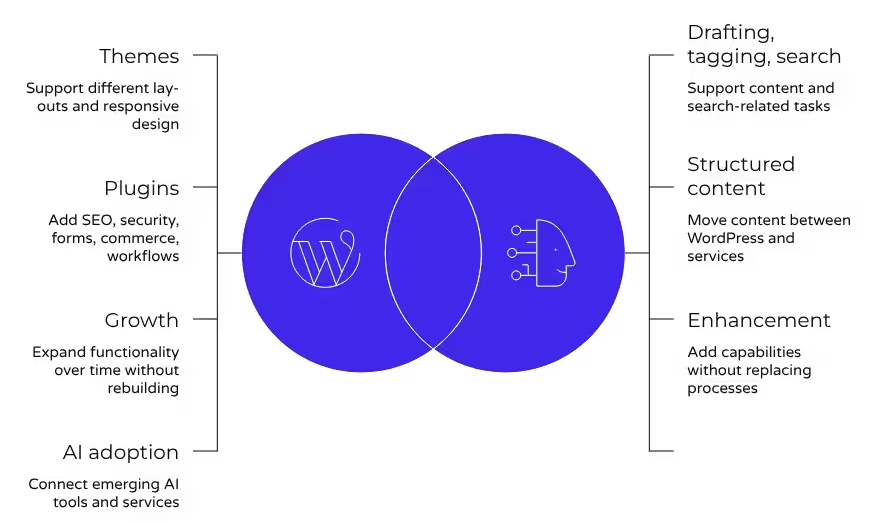
Wordpress themes support different layouts and responsive design choices
|
|
Features
|
wordpress plugins add SEO, security, forms, commerce, and workflow tools
|
|
Growth
|
Site owners can expand functionality over time without a full rebuild
|
|
AI adoption
|
Extensibility makes it easier to connect emerging AI tools and services
|
That kind of platform freedom protects budgets and keeps options open.
Seamless Integration with AI Tools and APIs
AI works best when it improves an existing system instead of trying to become the whole stack. Because WordPress is open source and widely used in web development, teams can connect AI tools through APIs while keeping publishing, governance, and editorial control where they already belong.
That approach lowers risk. You do not need to throw away your wordpress site to gain automation, content support, or smarter retrieval. You can keep your existing workflows and add what is useful.
- Connect AI tools to support drafting, tagging, or search-related tasks.
- Use APIs to move structured content between WordPress and outside services.
- Preserve the core publishing model instead of replacing proven processes.
This is the practical advantage of WordPress in the AI era. It accepts enhancement without forcing a disruptive rewrite that may cost more than it delivers.
Empowering Large Language Model Integration with WordPress
Integrating large language models within a WordPress framework is not only feasible but highly efficient. The existing structure of WordPress, with its mature taxonomy and custom post types, creates an organized environment essential for effective data training and retrieval. Utilizing APIs, developers can seamlessly connect their applications, enabling robust user experiences.
Transitioning to less mature headless solutions may disrupt this established workflow, resulting in a costly oversight as WordPress remains the best choice for maximizing AI capabilities while ensuring scalability and flexibility.
The Role of WordPress APIs in Training and Retrieval
Utilizing WordPress APIs offers a robust framework for training large language models and enhancing data retrieval processes. These APIs enable seamless communication between the content management system and external applications, streamlining access to structured data. By leveraging WordPress’s mature taxonomy and custom post types, businesses can create a rich dataset that optimizes user experience and drives search engine rankings. Transitioning to less established platforms risks losing these strategic advantages, ultimately hindering innovation and business growth.
Structured Content Management Optimized for LLMs
LLMs perform better when content is organized in consistent, predictable ways. Structured content management gives them cleaner inputs, clearer relationships, and easier retrieval. A wordpress site already supports that with pages, posts, categories, tags, and custom content structures.
This also benefits human users. The same order that helps LLMs can support stronger search engine rankings because content is easier to manage, update, and optimize. Good structure improves findability for both machines and people.
For teams exploring open models, WordPress can still serve as the controlled content layer. Its role is not to decide whether an LLM is open or closed. Its role is to provide trustworthy, governed source material. That separation is powerful. It lets businesses stay flexible as model choices change without rebuilding the underlying content operation.
How AI Enhances — But Doesn’t Replace — WordPress Functionality
AI enhancements can speed up work inside a content management system, but they do not remove the need for governance, editorial judgment, or structure. WordPress core still handles the foundation: publishing, permissions, organization, and updates.
That balance matters. The best use of AI is augmentation, not substitution. Human oversight keeps quality, brand voice, and risk management in place while automation reduces repetitive work. The next sections show where that balance creates real value.
Automating Workflows Without Sacrificing Human Oversight
AI is useful when it removes friction from routine tasks. In WordPress, that can mean automating workflows around drafts, tagging, summaries, or internal process steps. It supports faster content creation without turning strategy over to a machine.
Still, speed is not the same as quality. Human oversight remains essential for accuracy, approvals, tone, legal review, and final publishing decisions. That is especially true for business websites where mistakes affect trust and performance.
WordPress fits this model well because its content management structure keeps editors in control. Teams can review, revise, and publish from a familiar interface rather than relying on fully automated output. In design work too, AI can suggest layouts or copy ideas, but people still decide what reflects the brand, what serves users, and what should go live.
Augmenting Design, Content, and SEO Performance
WordPress stands out because AI can enhance areas the platform already manages well. That includes design support, publishing efficiency, and SEO execution. AI-first tools may generate pages quickly, but WordPress gives you durable control over the details that matter.
SEO is a strong example. WordPress already supports practical optimization through seo plugins, flexible page editing, and mobile-friendly themes built for responsive design. AI can help teams move faster, but the platform still provides the real framework.
- Use Yoast SEO or Rank Math to refine titles, readability, and meta descriptions.
- Improve responsive design choices with themes that work across devices.
- Support content updates and on-page improvements without rebuilding templates.
That is why WordPress remains such a strong option for search performance. It combines AI assistance with direct control over optimization, structure, and editorial standards.
WordPress for Enterprise: Scalability, Security, and AI Readiness
Large enterprises do not just need a website. They need scalability, dependable security, and a platform that can adapt to new demands. WordPress can support that when it is implemented and maintained with care.
Its AI readiness comes from openness and structure, while wordpress hosting options support growth over time. The platform is not limited to small projects or simple blogs. The final section below addresses the enterprise question directly and practically.
Handling High Traffic and Heavy-Duty Applications
Yes, WordPress is suitable for high traffic and demanding business websites when teams follow best practices. The compiled guidance is clear: performance depends on setup, hosting choices, updates, and disciplined maintenance. That is true for nearly any serious platform.
WordPress offers room to scale through stronger wordpress hosting plans, added resources, and platform extensions. Businesses can start smaller and expand over time by adding content, features, and integrations without changing systems completely. That reduces disruption and protects long-term investment.
Security also depends on execution. WordPress core receives regular updates, but security vulnerabilities can come from outdated plugins or poor third-party code. Strong hosting, trusted tools, staging environments, and update routines matter. For enterprise leaders, the takeaway is simple: WordPress is not the weak link. Poor governance is. With the right engineering partner, it can handle serious demand and AI-related growth.